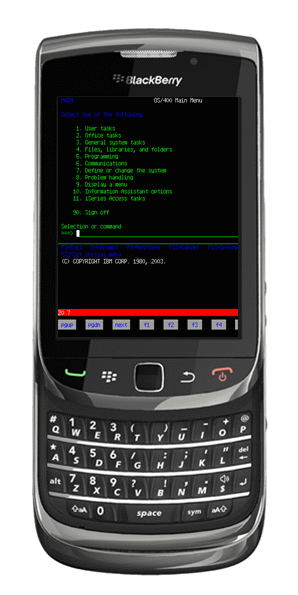
TN5250 for BlackBerry Phones

Mocha TN5250 for BlackBerry provides TN5250 emulation for AS/400 terminal access.
 

Features:

  • - Designed for blackBerry OS 4.5 or better
  • - All standard 5250 emulation features , including device names.
  • - Screen size 24x80 and 27x132
  • - 128 bit SSL (secure Socket Layer)
  • - Supports network types: WiFi, TCP and MDS
  • - Auto login option
  • - Colors can be customized
  • - Barcode scanner in the Torch version
  • - Many trim parameters
  • - Also older devices with track wheel is supported (8700 version)
  • - Supports 9 different EBCDIC codepages
  • - Free 30 days trial
  • - Free upgrades to new versions of the product
  • - Download today a free 30 days trial
 
 
Mocha TN5250 for Blackberry

Quick keyboard guide - Torch version


  • alt+sym = fxx keyboard
  • left shift + sym = keys dialog
  • right shift + sym = barcode scanner
  • right shift + sym = toggle cursor/scroll
  • sym + space = next field
  • volume key up = page up
  • volume key down = page down
  • "2 finger pinch = zoom in/out
  • 1 finger = scroll the screen
  • 1 finger on the key banner below the red status line, scroll keys horizontal
  • Tap the screen = move cursor to the position
 
 
Price information
29.85 USD (~21 EUR)
299 USD for an unlimited Company license
Lifetime free upgrades and support
 
Mocha TN5250 for Blackberry

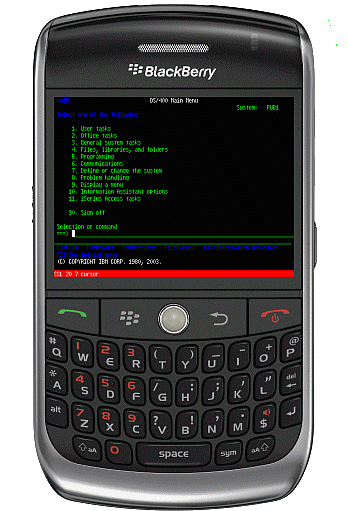
Quick keyboard guide - Keyboard version


  • alt+sym = fxx keyboard
  • left shift + sym = keys dialog
  • right shift + sym = toggle cursor/scroll
  • alt + space = next field
  • volume key up = page up (new in v 1.1)
  • volume key down = page down (new in v 1.1)
 
 
Price information
29.85 USD (~21 EUR)
299 USD for an unlimited Company license
Lifetime free upgrades and support
 
 
Mocha TN5250 for Blackberry Storm

Quick  guide for the touch screen version (Storm)


  • left shift + sym = keys dialog (*)
  • right shift + sym = fxx keyboard
  • left shift + space = page up (*)
  • right shift + space = page down
  • volume key up = previous field
  • volume key down = next field
  • 2 fingers will scroll the screen
  • 1 finger moves the cursor
  • click = ENTER
(*) Left shift is only possible in landscape.


Installation:


ProductDevice typeVersionFileOTA File User manualChange log
TN5250Torch2.0 tn5250bbt.zip tn5250t.jad Online user documentation. tn5250bbt.txt
TN5250With a real keyboard1.5 tn5250bb.zip tn5250.jad Online user documentation. tn5250bb.txt
TN5250With a real keyboard, (OS 4.2 - 4.4 only)  1.3 tn5250bb13.zip Online user documentation. tn5250bb.txt
TN5250Touch screen (Storm)1.6 tn5250bbs.zip tn5250s.jad Online user documentation. tn5250bbs.txt
 
  • - Unzip the downloaded file to a folder.
  • - Connect the BlackBerry to the PC with a cable
  • - Start BlackBerry Desktop Manager on a PC, and use the Application loader to install the software.

A set of Desktop Manger screen dumps can be seen  here

OTA file
: Download direct to the BlackBerry (OTA = Over-the-air , in other words use the BlackBerry phone browser to download software direct to the phone)
Download direct with the BlackBerry Web Browser from our OTA (Over-the-air) page at http://mochasoft.dk/bb.htm


Network:

A Blackberry can connect to the AS/400, either direct with WiFi, TCP/IP, or using a BlackBerry Enterprise Server with MDS. Using MDS, the Blackberry firewall must be configured to allow data from the phone to the AS/400.
Using TCP/IP, in most cases the BlackBerry phone TCP/IP (options - advanced options - TCP) must be configured with an APN name as to give it access the Internet. Some BlackBerry phones are locked and allows only MDS Services. Also the AS/400 must allow access from the Internet.


Order a license:

As there are many Blackberry phones and OS versions, we cannot test on all devices. Also network access from a BlackBerry device to the AS/400 may be a problem. Therefore, make sure to test for some time before making an order.
 
  •    1 single user license = 29.85 USD
  •    1 unlimited company license = 299 USD
 
With a company license it is possible to install the product on an unlimited number of Blackberry phones as long as the phones belong to a single company in one country.
 
With a single user license it is possible to install the product on one BlackBerry phone.
 
Lifetime license: Unlimited free product updates. A license key is valid for any future release of the product.
There are no maintenance or support fees. We offer free e-mail support to all customers.  
 
Buy Now